
Album selection that couples finish in hours, not months
Couples build the albums themselves. You shortlist, pull the originals and print.
Last updated 4 November 2026
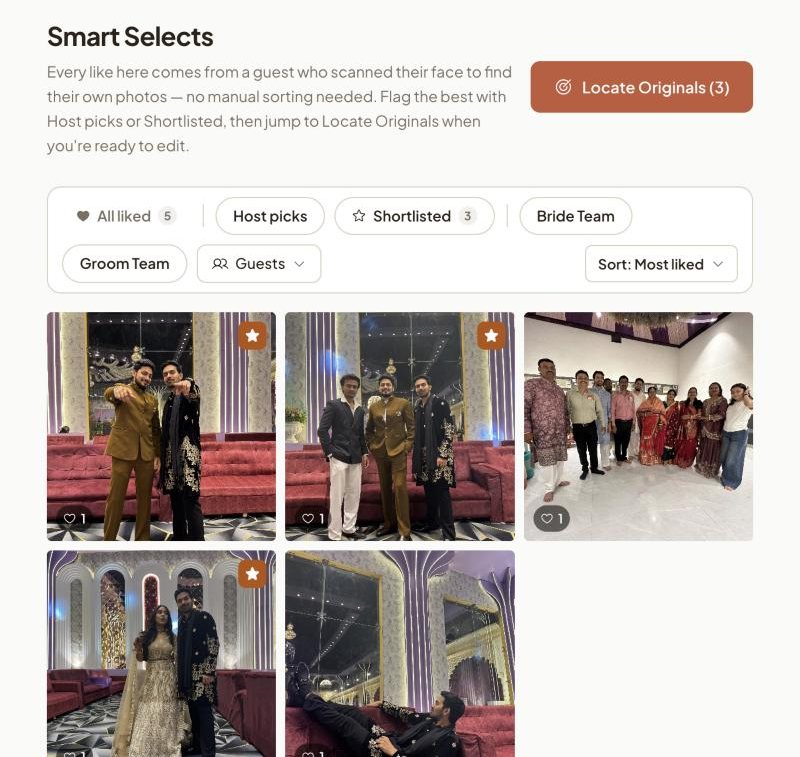
How album selection works on Vyavasth
Share one gallery link
The couple and family open the same gallery link or QR on their phones. Guests can tell you which side they are from, using labels you set, such as Bride Team and Groom Team.
Everyone likes the photos they want
Likes are saved as they tap. Likes from the hosts, the couple and the family members who have the passcode, are marked as Host picks, so you can see what the family chose apart from everyone else.
You filter and shortlist
In the Smart Selects tab, filter likes by Host picks, by team, or by any guest who liked something, and sort by most liked. Shortlist the photos that go into the album.
Pull the originals
Point Vyavasth at the folder of originals on your laptop. It finds the shortlisted photos and their RAW files and copies them into one folder for your editor.
A collection per album
Bride side, groom side, calendar, table book. One photo can sit in several.
Only the right people edit
The couple picks the few people who can change collections.
Likes still work
Families who want you to choose can just like photos.
Originals in one click
Locate Originals copies the shortlist and its RAW files for your editor.
Made for you if
- Couples and families take weeks to finish choosing album photos
- You make more than one album, calendar or table book per wedding
- Your editor loses hours matching screenshots to file names
Not the right fit if
- Your clients already send a final list on time
- You deliver small shoots with one album and under 200 photos
Photo selection ka kaam, jisme 2 mahine tak lag jaate the, wo ab 2 ghante mein hone laga hai. Album selection feature ne kaam bahut hi aasan kar diya hai.
The details
Why album selection takes months, and what changes
In most Indian weddings the album waits on selection, not on editing. The studio sends a pen drive or a Google Drive link with thousands of photos, the couple promises to choose, the family wants a say, and the list comes back weeks later as screenshots or file numbers on WhatsApp. Then someone has to find those files by hand.
Vyavasth moves selection to the place the family already is: the gallery on their phone. Liking a photo is the selection. Nothing has to be typed, sent or matched by hand, so the studio can start the album as soon as the likes are in.
Collections for every album, calendar and table book
Indian weddings rarely end with one album. Collections let the couple create a named list for each product, such as Bride side album, Groom side album, Calendar or Table book, or one per function, such as Haldi best 150, and add photos to them while they browse.
Collections answer the question likes cannot: which album does this photo go in. The studio sees every collection the couple builds, shortlists from it and pulls the originals, instead of guessing the final 300 from a pile of 500 likes.
- Create, rename and delete collections from the gallery on the phone.
- One photo can be in several collections, so the varmala can go in both albums and on the calendar.
- Only the few people the couple chooses can add to or change collections. Everyone else can still view and like.
- Likes stay as they are, for families who want the studio to make the final pick.
Filters made for Indian weddings
- Host picks: only the photos the hosts liked, the couple and family with the passcode.
- Team: the bride's side, the groom's side, or any labels you set for the event.
- Guests: anyone who has liked a photo, searchable by name, sorted by how much they liked.
- Most liked: what the whole family keeps coming back to.
- Shortlisted: your team's final picks for the edit.
Filters combine, so "Host picks from the bride's side, most liked first" is two taps.
What changes for the studio
- Albums start in days, because selection no longer blocks the edit.
- No file-number lists to decode and no wrong photos printed.
- The couple sees a premium, branded gallery instead of a drive folder, which is what they tell their friends about.
What's new
- Selection team with edit access, chosen by the couple
- Collections: one per album, calendar or table book
Questions
What are collections in album selection?
Named lists of photos, like albums in Google Photos, that the couple builds inside the gallery, for example Bride side album, Groom side album or Calendar. The studio sees every collection and shortlists from it.
Can one photo be in the bride side and groom side albums?
Yes. A photo can be in several collections at once.
Who can create and edit collections?
The couple and the few people they choose. Other guests can view and like photos but cannot change collections.
Does the couple need to install an app to select photos?
No. The gallery opens in the phone's browser from a link or QR code. They sign in with their WhatsApp number or Google so their likes are saved to them.
Can I see only what the family selected?
Yes. Likes from the hosts, the couple and family members with the passcode, show up as Host picks. Filter to just those, combine them with the bride's side or groom's side filter, or pick one guest by name.
Is album selection available on every plan?
Yes. Smart Selects, including the filters and locating originals, is on every plan, including pay per event.
Can relatives select photos too?
Yes. Anyone you share the gallery with can like photos. You decide whose likes count by filtering by host, team or guest.